React-Prosemirror vs Vanilla ProseMirror vs TipTap3 performance comparison
React-Prosemirror vs Vanilla Prosemirror vs TipTap3 performance comparison
TL;DR
React-Prosemirror makes development much easier if working with ProseMirror and React. Can use all the same plugins and features. And if using nodeviews it is much easier, we can access react context, hooks and state. But it comes with a cost. As we add more and more nodes to the document it has to pay the react reconciler tax.
Vanilla ProseMirror is the fastest, but it needs the most amount of work for a full featured editor.
TipTap3 is kind of a full featured editor from day 1 and performance wise almost identical to vanilla ProseMirror until we start adding nodeviews, we can use react context, hooks,
state with ReactNodeViewRenderer to make it easier to develop, but it uses react Portals which adds tax.
React-Proseirror performance issue becomes noticable at 5k nodes. TipTap3 performance issue becomes noticable around 2.5k-5k nodes with nodeviews.
Introduction
Vanilla Prosemirror is the standard technology for rich text editing in the browser. It is a powerful and flexible library that provides a wide range of features and customization options. It comes with some basic plugins, but requires some work to make it a full featured online editor. On the other hand it has a huge community and there are a lot of free plugins made by other developers you can use to customize your editor.
TipTap3 is an abstraction layer built on top of Prosemirror, which provides a lot of pre-built plugins to start with. Much easier to plug and play with the official plugins. It is also fully customizable, but the abstraction layer makes it harder to customize. It has a solution for easier custom node views using ReactNodeviewRenderer which makes it possible to use React components as node views, and accessing state and context. But we will see that it comes with a cost.
React-Prosemirror moved the rendering out of the editor view and into React. This makes it much easier to use ProseMirror with React: you can use plain React components for custom node views, share normal React context and hooks, and let the editor UI live in the same component tree as the rest of your app. You still get ProseMirror’s document model, transactions, plugins, and selection handling, but without fighting a separate DOM-rendering lifecycle. This library provides an alternate implementation of ProseMirror's EditorView. It uses React as the rendering engine, rather than ProseMirror's home-brewed DOM update system. This allows us to provide a more comfortable integration with ProseMirror's powerful data model, transformations, and event management systems.
Test Cases
Test Case 1: Engine throughput and the cost of holding state as the document grows
What the test does:
From an empty editor, in a single browser session, append paragraphs to the end of the document as fast as the engine allows. After every 200 appends, record a checkpoint (nodes, elapsedMs) and yield one animation frame so the browser can paint and the test harness can read CDP metrics. Every 2 seconds, an outer monitor polls Chrome's Performance.getMetrics and records the cumulative cost across six counters: ScriptDuration, TaskDuration, JSHeapUsedSize, Nodes (DOM), LayoutCount, RecalcStyleCount.
How each "keystroke" is fired. Inside page.evaluate, for each cycle we dispatch synthetic InputEvent("beforeinput", {inputType: "insertText", data}) events for the characters in "typing ", followed by a synthetic KeyboardEvent("keydown", {key: "Enter"}). Each editor's input plugin handles them as it would a real keystroke. No real OS-level input pipeline, no IME, no focus management — just the editor's reaction to the event.
- We keep going until a single 200-node batch exceeds 5s here, ≈40 nodes/sec - well past usable, or heap > 3.5 GB, or the renderer crashes, or a 50,000-node safety cap.
- We don't measure per keystroke latency.
- We always append at the end of the document.
- Synthetic events, we don't try to replicate a human typing experience, only pure engine throughput.
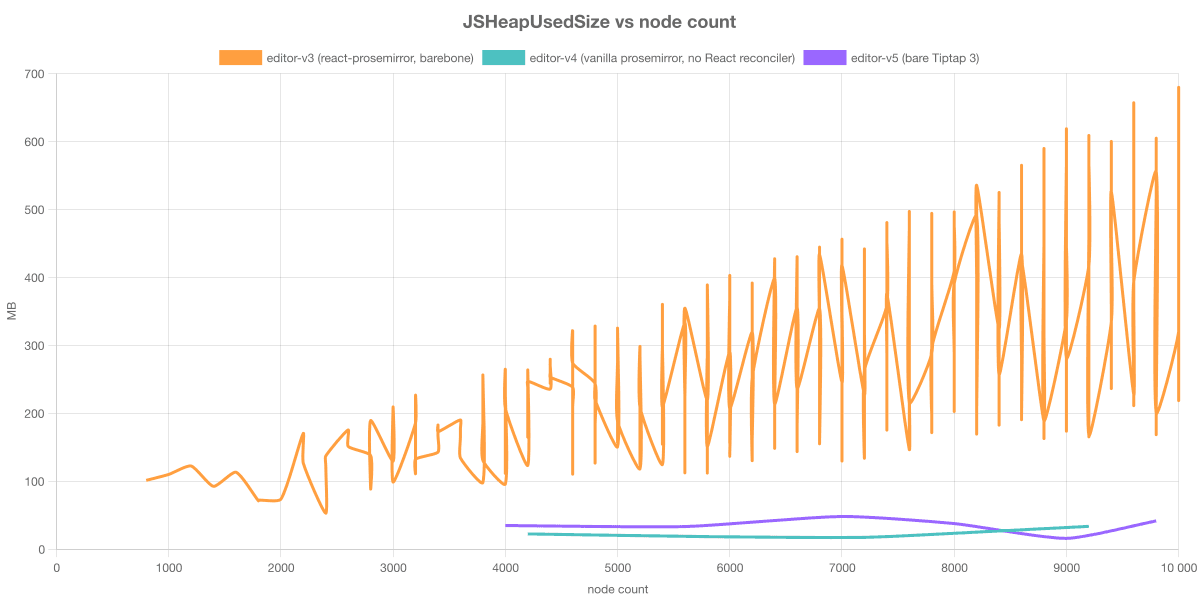
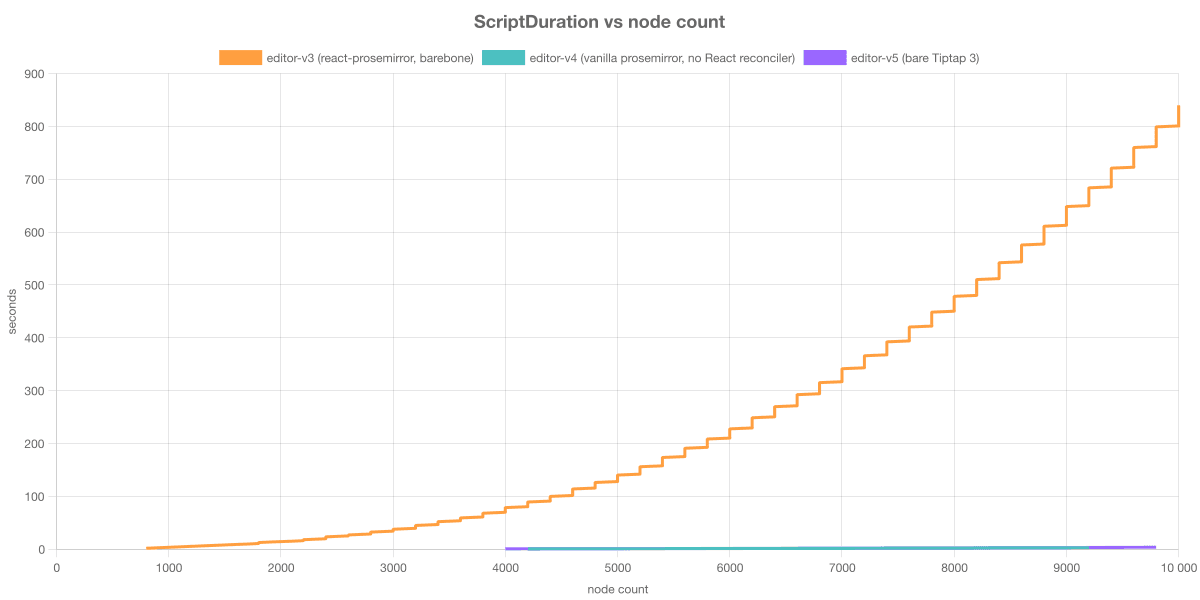
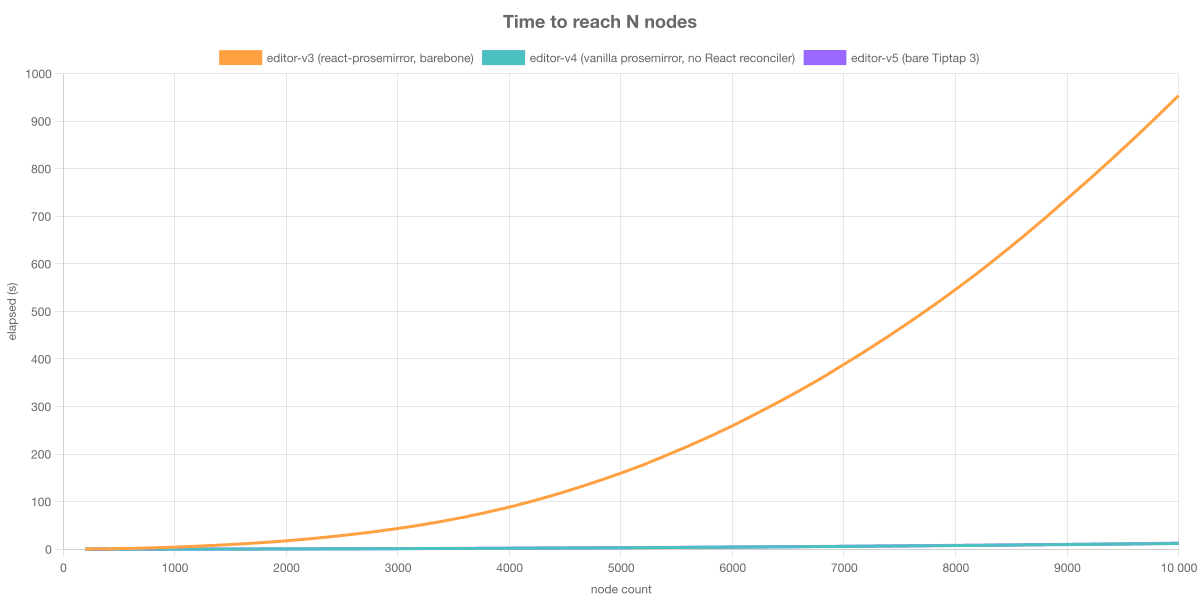
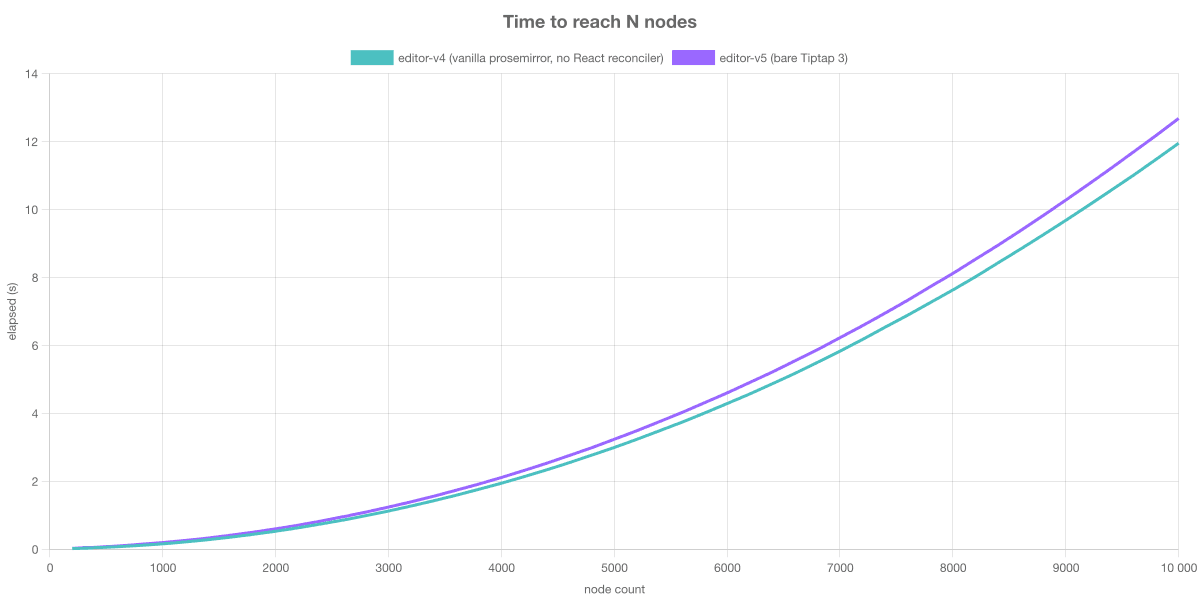
Conclusions:
- React-Prosemirror pays a per transaction reconciler tax that scales with the document size. for every new paragraph react need to walk a growing tree, even when nothing has changed in the existing paragraphs
- Vanilla ProseMirror and TipTap3 let the
EditorViewto handle DOM updates directly, the cost is proportional to "what has changed" , not to document size. - Memory usage scales with document size for Vanilla ProseMirror and TipTap3, but not for React-Prosemirror. For React-Prosemirror every paragraph in the document also exists as a React fibre - a JS object holding props, hooks, refs, parent/sibling pointers, and an alternate fibre for the next render.
Disclosure:
We needed to patch a memory leak in the official React-Prosemirror implementation, without it the memory usage skyrocketed, and the stress test ended pretty quick.
Test Case 2: Cold load
What the test does:
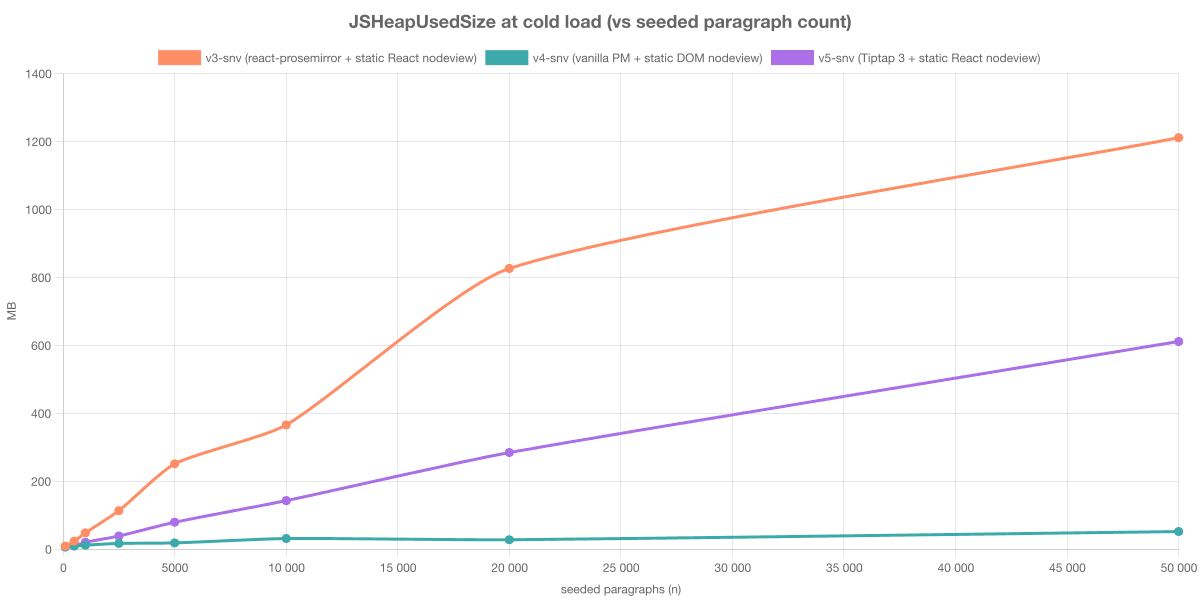
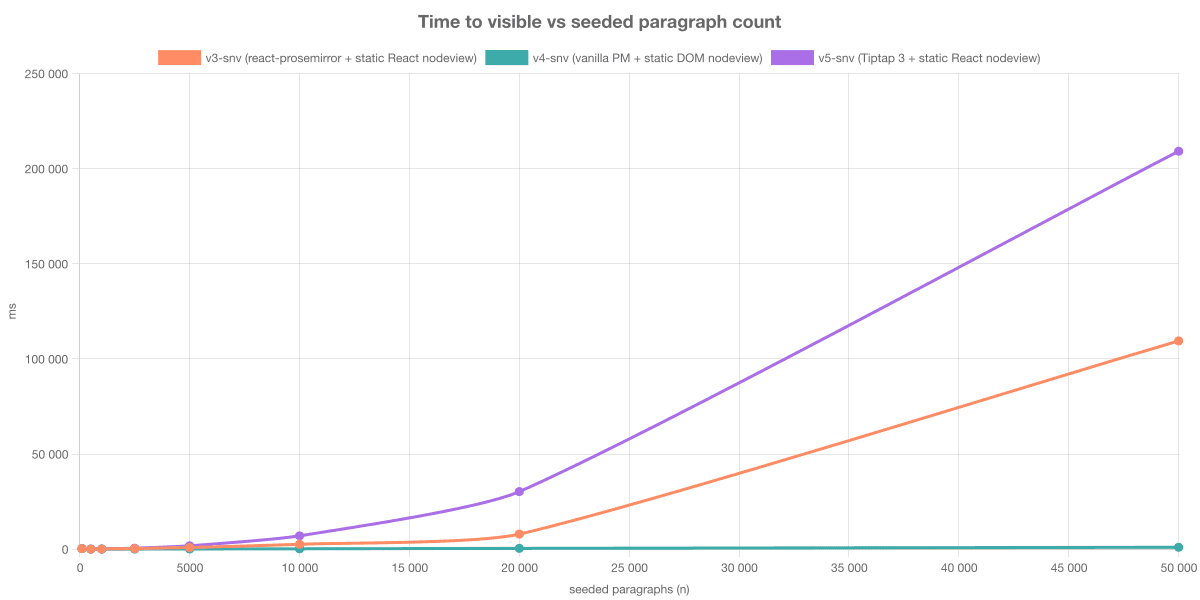
- We render the 3 editors with 500, 1000, 2500, 5000, 10k, 20k 50k nodes in the document and we measure time to React tree mount, ProseMirror view init, and rendering N paragraphs into the DOM.
Conclusions:
- Mount cost scales with how many React fibres your engine creates, not how many DOM nodes the browser holds. Vanilla ProseMirror has zero React fibres for nodes so it has a flat curve. The two React-rendered engines each pay a per-paragraph reconciler cost at mount; Tiptap's ReactNodeViewRenderer adds another layer on top, which is why it ends up worst.
Test Case 3: Keystroke latency (lag breakpoint)
What the test does:
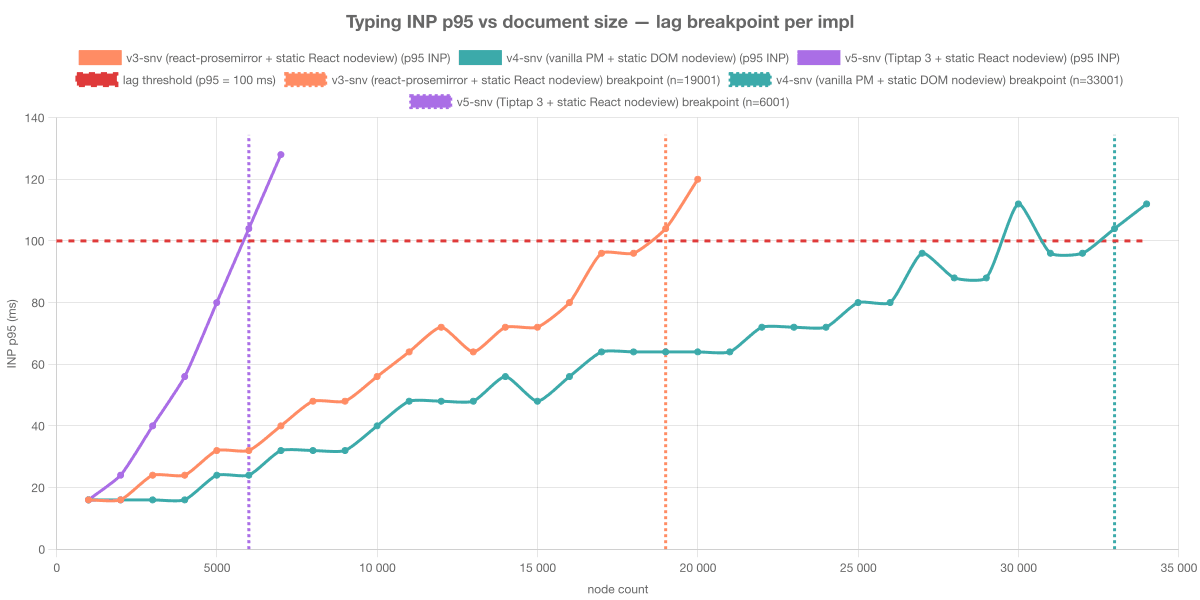
- Find the document size where typing feels laggy
- Increment doc size by 1k paragraphs with nodeview in each line
- Fire 150 real Chromium keystrokes via
page.keyboard.press("a") - Stop when p95 INP > 100 ms for two consecutive iterations.
Conclusions:
- Vanilla ProseMirror's typing stays smooth ~5× longer than Tiptap with the same nodeview. Same per-paragraph React component, same paragraph schema, same keystrokes - the only thing different is what owns the editor surface. Vanilla ProseMirror applies the mutation directly to the DOM and updates the affected fibre; Tiptap's ReactNodeViewRenderer adds portal-bridge synchronization on top, which dominates per-keystroke cost at scale.
- A memoized React nodeview is not free at scale. Even with React.memo, the reconciler still has to visit each fibre on every keystroke to ask "should I render?" - it can skip the render phase, not the walk. At 30k+ fibres, that walk alone exceeds the 100 ms budget.
Some reference:
| Document | Paragraphs (≈) |
|---|---|
| Typical blog post | 30–80 |
| Long-read article (Wired feature, NYT Magazine) | 100–250 |
| Wikipedia article ("World War II") | ~500 |
| Master's thesis | 1,000–2,000 |
| The Great Gatsby | ~700 |
| Harry Potter and the Sorcerer's Stone | ~2,500 |
| Moby Dick | ~3,000 |
| The Lord of the Rings (entire trilogy) | ~6,500 |
| War and Peace | ~8,000–10,000 |
| All 7 Harry Potter books combined | ~14,500 |
| The complete works of Shakespeare | ~25,000 |
